
Loading blog...
A practical guide to upgrading from a generic Gmail address to professional email on your own domain. Covers buying a domain, then choosing between Google Workspace and Purelymail — with step-by-step setup for both.

Rob Heller
Published Apr 29, 2026
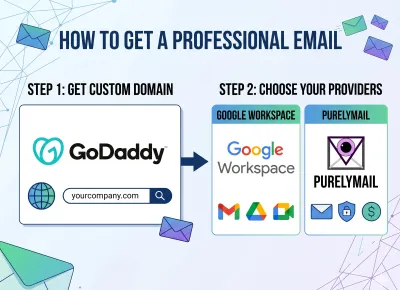
Table of Contents
Share this article
When you reach out to a prospective client, a potential partner, or someone you'd like to hire, the first thing they see isn't your pitch — it's the address it came from. A message from yourname1987@gmail.com lands differently than one from you@yourcompany.com, even when the words underneath are identical. Right or wrong, people read your email address as a signal of how seriously you take your business. If the domain doesn't match the company, the brain quietly files you under "hobby project" before the first sentence is read.
If you're building something real — a startup, a consultancy, a service business, even a side project that's starting to take itself seriously — moving off a generic email is one of the highest-leverage upgrades you can make to your professional image. It costs less than a coffee a week, takes about an hour to set up, and pays for itself the first time someone forwards your email internally without second-guessing whether you're "real."
Below I'll walk through how I recommend doing it: first, registering a domain, and then setting up email at that domain using one of two providers I trust — Google Workspace if you want the full productivity suite, or Purelymail if you just want clean, cheap, no-nonsense email.
Your domain is the part that lives after the @ in your email and the https:// in your website — swivl.tech, in our case. You have to own one before you can put email on it.
You don't need to overthink this. Pick a registrar with fair pricing and a sane interface. The two I'd point most people to are:
Cloudflare Registrar sells domains at wholesale cost — they don't mark them up, they don't try to upsell you privacy protection (it's included), and the renewal price is the same as the first-year price. The catch is that you have to use Cloudflare for your DNS, which is a feature for most people and a non-issue for the rest. This is what I use.
Porkbun is the friendly alternative. Pricing is excellent, the dashboard is clean, free WHOIS privacy is standard, and they don't play the bait-and-switch renewal games other registrars do. If you don't want to bother with Cloudflare's ecosystem, go here.
I'd specifically steer you away from GoDaddy and Network Solutions. Their prices climb on renewal, the upsell experience during checkout is exhausting, and migrating away later is more painful than it should be.
When picking the actual name, keep it short, easy to spell on a phone call, and matched to your business name. A .com is still the gold standard if you can get one. .co, .io, and .tech are all fine — we use .tech for a reason — but avoid the bargain-bin TLDs like .xyz or .online for anything client-facing. They quietly cost you credibility.
Buy the domain, finish checkout, and come back. The rest takes about thirty minutes.
Google Workspace is the heavyweight choice. You're not just buying email — you're buying Gmail's interface, Google Calendar, Google Meet, Google Drive, Docs, Sheets, Slides, and a real admin console for managing users. For most teams, especially anyone who plans to hire, this is the right call.
A personal aside before I get into the setup: I have a soft spot for Google Workspace because the very first version of Swivl was literally built on it. Not as a product on top of an API — I mean built with it. Sheets and Forms, glued together with whatever I could rig up, used as the operational backbone of the company in those early months. A form on the front end, a sheet on the back end, and a few formulas doing the work that a real application would eventually do later. That's how Swivl started.
I was an early adopter of Workspace (back when it was still called Google Apps for Your Domain), and at the time it felt genuinely revolutionary. Microsoft Office was the incumbent, and Office still meant "the thing you install on your laptop." If you wanted to share a document, you emailed an attachment and hoped nobody replied with their own conflicting copy. Workspace flipped that. Documents lived in the cloud. Two people could edit the same sheet at the same time. You could open your work from any computer with a browser. That was a step change, and Workspace was the product that actually made the "office from anywhere" promise real.
Was every Workspace tool feature-for-feature with Office? Honestly, no. Excel had macros and pivot tricks Sheets didn't, Word had layout features Docs didn't bother to match, and PowerPoint had high-end design tools that made Slides look simple by comparison. But here's the thing — almost none of the bells and whistles I was "missing" were things I actually used. The 90% of functionality I needed was in Workspace, and the 10% I gave up was the 10% I would have ignored anyway. For a small company trying to move fast, the trade was a bargain. It still is.
Pricing starts at $7/user/month for Business Starter (30 GB of pooled storage per user) and goes up from there. The Business Standard tier at $14/user/month is what I'd actually recommend for most growing companies — you get 2 TB per user, recordable Meet calls, and shared drives.
1. Go to workspace.google.com and click Get Started. Enter your business name, team size, and country.
2. When it asks about a domain, choose "Yes, I have one I can use" and enter the domain you just bought.
3. Create your first admin account — typically you@yourdomain.com. This is the account you'll use to manage everything.
4. Verify domain ownership. Google will give you a TXT record to add to your DNS. Log in to your registrar's DNS settings (Cloudflare or Porkbun), add the record exactly as shown, and click verify in the Workspace setup. Propagation usually takes a few minutes.
5. Update your MX records. Google will display five MX records. Delete any default MX records on your domain and add Google's. This is what tells the internet to deliver mail for your domain to Google's servers.
6. Add SPF, DKIM, and DMARC records. Workspace will walk you through generating these. Don't skip them — they're what keeps your email out of recipients' spam folders. Twenty minutes of setup here saves you a year of mysterious deliverability problems.
7. Add your team. Each additional user is billed at the per-seat price.
After DNS propagates (usually under an hour, occasionally up to 24 hours), you log in at mail.google.com with your new address and you're done.
Purelymail is the indie alternative. It's a small, well-run, no-frills email host that charges roughly $10 per year for the standard plan with unlimited domains and unlimited addresses, or about $30/year for higher quotas. There is no per-user pricing. If you have a five-person team, the bill is the same as if you have one user.
You don't get Docs or Calendar or Drive — it's email and a webmail interface, full stop. But the email itself is solid: standard IMAP and SMTP, clean spam filtering, decent webmail, and a refreshingly honest pricing page.
1. Go to purelymail.com and create an account.
2. In the dashboard, add your domain under Domains.
3. Purelymail will give you a set of DNS records to add at your registrar — typically MX records, an SPF (TXT) record, a DKIM (TXT) record, and a DMARC (TXT) record. Add all of them. The dashboard checks them automatically and turns each line green as it picks them up.
4. Once the domain is verified, go to Users and create your first address — you@yourdomain.com, plus any aliases you want like hello@, support@, or billing@. Aliases are unlimited and free.
5. Log in to webmail at purelymail.com, or set up your account in Apple Mail, Outlook, Thunderbird, or any client that supports IMAP. Purelymail provides the server settings on a single page.
That's the whole setup. It is genuinely fast.
The honest framing: this is a question of how much infrastructure you want bundled in.
Pick Google Workspace if you have a team (or plan to), you want shared calendars and video meetings without bolting on a separate tool, you'll lean on Docs and Drive for collaboration, you sometimes need a real admin console to provision and deprovision people, or you simply want the most universally-recognized professional setup. Workspace is the safe, boring, correct choice for almost any company that's hiring.
Pick Purelymail if you're a solo founder or a small operator, you already use other tools for documents and calendars (Notion, Apple Calendar, Fastmail Calendar, etc.), you don't want to pay per seat as you add aliases, you appreciate small businesses run by people who clearly care about their craft, or you just want email to be email and nothing else. It is excellent for consultants, indie hackers, and small partnerships where five people might share a domain but only need their own addresses.
The cost difference is real but probably not the deciding factor for most: Workspace at $7/user/month for a team of four is $336/year; Purelymail for the same team is $10–30/year. That's a meaningful gap if you're bootstrapping. It's a rounding error if you have revenue.
What matters more is what you'll actually use. If you'll touch Google Docs and Calendar daily, Workspace pays for itself in the first week. If you won't, you're paying for features that just sit there.
A Final Note on Image
Whichever option you choose, the upgrade is the same: you'll send your next email and it will look like it came from a business. People will reply faster. Cold outreach will land in inboxes instead of spam. Your invoices will be taken seriously. Your domain and your email will match — and that small consistency is one of the cheapest, most underrated trust signals you can buy.
Get the domain today. Pick one of the two providers above. Be done before lunch.
— Rob
Join thousands of contractors already growing with Swivl's AI-powered platform.